STN Digital: From Creative Brief to Wrike Task in Seconds

STN Digital
Client
STN Digital
Industry
Creative Agency
Technology
Google Slides, Google Docs, Claude, Gemini, Wrike, Box

The Client

STN Digital is a digital media agency specializing in sports and entertainment brands. Their creative teams produce high-volume content on tight timelines, working out of Google Slides and Docs to write creative briefs, then handing each concept off to production through Wrike and Box.

Every brief STN's production team writes eventually has to become a Wrike work order — a task with the right template, the right fields filled in, and a folder structure ready for review. At STN's volume, that handoff happens constantly, and until now, every one of those handoffs was manual.

The Challenge

Turning a creative brief into a Wrike task meant a PM sitting down and doing it by hand, every time. Read the brief in full, often spread across multiple slides or pages. Open Wrike and create a new task from scratch. Fill in six or more custom fields — Points, Time Budget, Posting Date, PM, CS Lead, BOX Link — copy-pasting values out of the brief. Write the task description, formatting deliverables and dimensions correctly. Manually create the Box folder structure and copy the link back into Wrike.

At roughly 15 minutes per work order, and one work order per concept, the cost compounded across every brief on the calendar. And because the process was manual, it wasn't just slow — fields got missed, mistyped, or formatted inconsistently, and every document with multiple concepts meant repeating the entire process concept by concept.
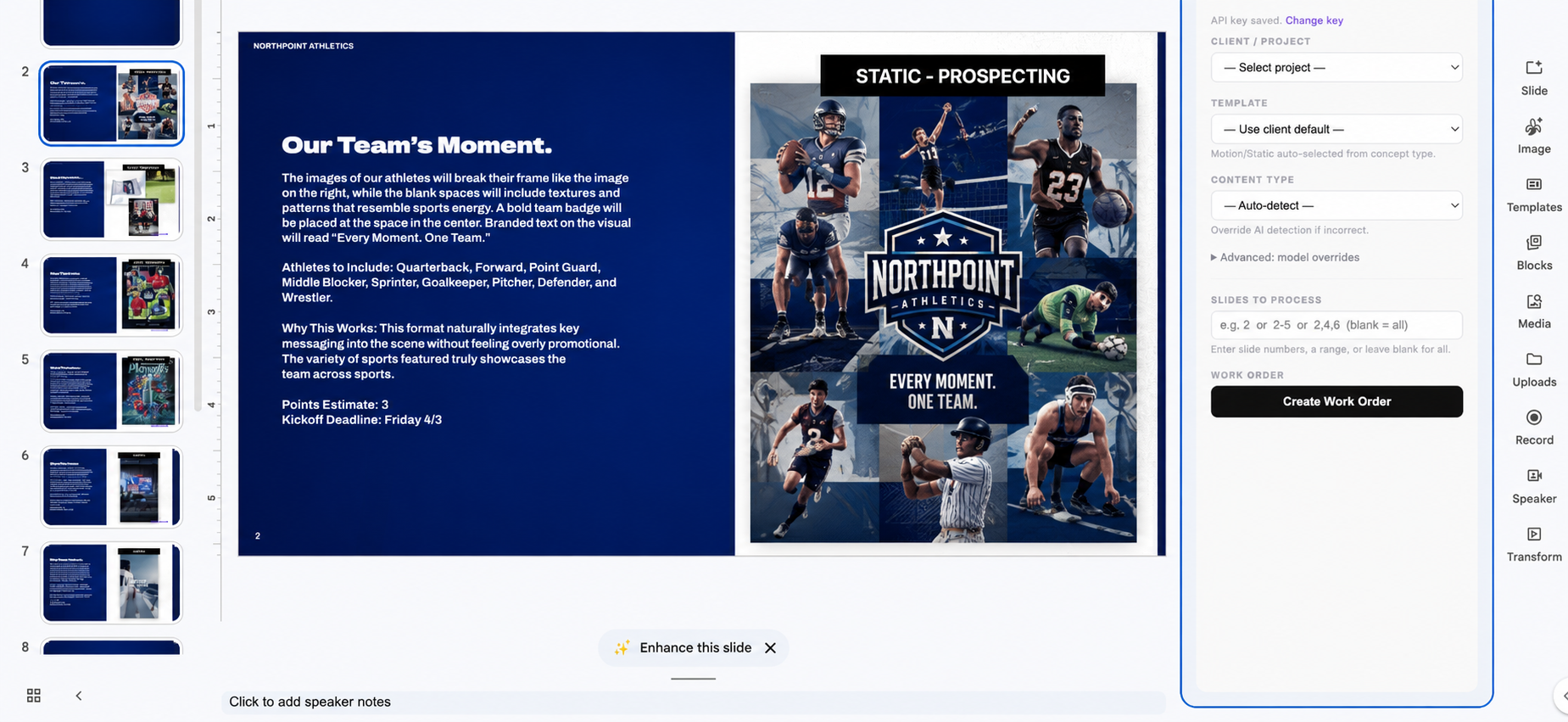
What We Built

SmartFlow is a Google Workspace add-on that lives directly inside Slides and Docs — wherever STN's creative briefs already get written. A PM opens the sidebar, selects the client, and clicks Create Work Order. From there, the rest happens without anyone touching a form.

  • AI extraction: The backend reads the entire document — text, slide layouts, and any inspiration images embedded or linked — and passes it to two AI models working in tandem: Claude for structured text extraction, and Gemini's vision model for reading inspiration imagery. Together they extract more than 12 fields per brief: concept title, content type, deliverables and their dimensions, post date, platforms, points value, copy, creative direction, objective, and any client-specific notes.
  • Confidence scoring: Every extracted field carries a confidence score. High-confidence fields go into Wrike clean. Fields the model is uncertain about are visually flagged in the task description, so a PM can spot and correct them without re-reading the whole brief.
  • Content type detection: SmartFlow classifies each concept as Static, Motion, Video, or Illustration automatically, and selects the matching per-client Wrike template — motion and static concepts get different HTML descriptions. A PM can override the detected type from the sidebar if needed, which also swaps in the correct template.
  • Wrike task creation: The task is created in Not Ready status in the Work Order Workflow, assigned to the correct client folder, with all six custom fields set automatically: Points, Time Budget, Posting Date, PM, CS Lead, and BOX Link.
  • Box provisioning: Three subfolders — STN Review, Assets, and Project Files — are created per concept. If a concept needs a social overlay, the proof submission link is grouped alongside the STN Review folder link directly in the task description.
  • Multi-concept documents: The Docs sidebar detects every ALL-CAPS concept heading in a brief automatically. The PM chooses which concepts to process, or processes all of them at once, and each one gets its own Wrike task and Box folder structure.

The template system is built to extend without rework — new per-client templates load dynamically, with no changes needed to the sidebar itself.

From sidebar click to a completed Wrike task and provisioned Box folders, the full pipeline runs in under 60 seconds, regardless of how complex the brief is.

What We Delivered

  • SmartFlow Google Workspace add-on, running inside Slides and Docs
  • Dual-model AI extraction pipeline (Claude for text, Gemini for vision) reading full briefs, including embedded inspiration images
  • Automatic Wrike task creation with the correct per-client template, content type, and all six custom fields set
  • Automated Box folder provisioning (STN Review, Assets, Project Files) with links written back into the Wrike task
  • Per-field confidence scoring, with low-confidence fields flagged for PM review
  • Multi-concept detection and batch processing from a single document
  • Extensible template system — new client templates load without sidebar changes

Outcome

With SmartFlow, work orders become significantly faster and more automated. Instead of spending around 15 minutes per work order, the process takes less than 60 seconds. SmartFlow automatically extracts 12+ fields, compared to 6+ fields that must be entered manually. It also eliminates the need to fill out manual form fields and automatically detects four content types: Static, Motion, Video, and Illustration.

Reduction in time spent creating work orders: 95%. Fields forgotten, mistyped, or inconsistently formatted: zero — every task now follows the same structure, every time. That time comes back to PMs for higher-value review and strategy work instead of form-filling.

From the start, they were professional, responsive, and genuinely listened to our concerns, including some specific security considerations we needed addressed. Throughout the build, they hit every timeline and deliverable outlined in the contract, turned around feedback within a day, and kept communication tight through a dedicated Slack channel they set up.
Evan Shechet
Program Supervisor

Looking Ahead

The template system was built for growth from day one — dynamically loaded, per-client, with no sidebar changes required to add a new one. As STN takes on new clients and content types, SmartFlow extends rather than needing to be rebuilt.

from ~15 min to <60 sec
Time per work reduced
12+, automatically
Fields extraction
Portrait of a man smiling in casual gray sweater against dark background.
Let’s make something that matters.
Anna is here to guide you every step of the way.

Tell us where the friction is.We'll show you what's possible.

1,000+ workflows built for brands and organizations.